Back to Work

Plantopedia —
a plant care
companion.

A mobile app that replaces "I just water it when I remember" with a care routine that actually sticks. Built from 22 interviews with real plant owners.

Client
Solo Concept
My Role
UX Designer + Research
Timeline
12 Weeks
Platform
iOS · Companion App
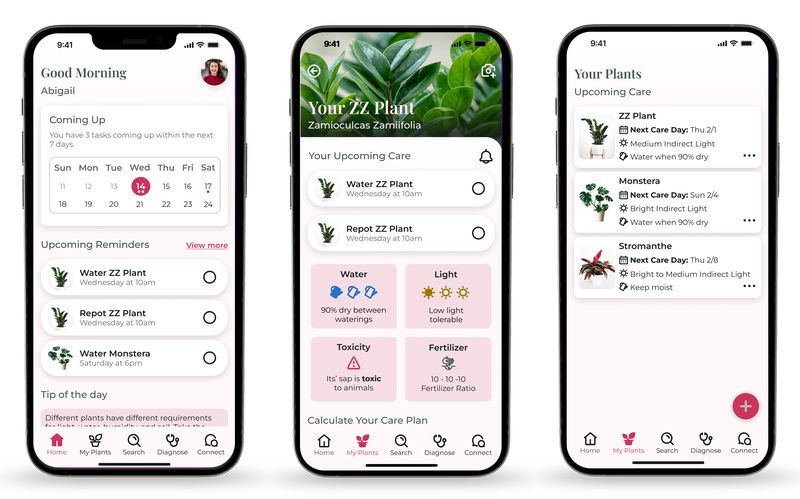
Plantopedia — plant care companion app mockup
Image to drop in
plantopedia-card.png

From guesswork
to routine.

Most people struggle to care for their plants, and existing apps fall short. I recruited 12 plant owners from the nursery I worked at, listened to what was actually getting in their way, and designed a companion app that replaces guesswork with confidence.

A Research Participant Said
"I just water it when I remember." — and nearly every single person I interviewed said some version of the same thing.

People aren't lazy.
They're confused.

People weren't neglecting their plants out of laziness. They genuinely didn't know what their plants needed, and existing apps weren't making it any clearer.

The opportunity wasn't to build another plant encyclopedia. It was to build something that told people exactly what to do, and when, in a way that felt personal rather than clinical.

01
Generic Reminders

Most apps sent reminders that didn't reflect a plant's actual needs — so they felt arbitrary and easy to ignore.

02
Overwhelming Advice

Care advice online was conflicting and dense, creating anxiety instead of confidence.

03
No Prompt, No Action

Owners weren't forgetful — their environment simply wasn't prompting them at the right moment, in the right way.

04
Discovered Too Late

Most people didn't know their plant had specific requirements until something had already gone wrong.

Sketching the shape
of the idea.

Before any pixels, I mapped out what the app could feel like in its loosest possible form — a calendar overview, checkbox-driven care, and a photo-based way to add new plants. The hand-drawn quadrants below each paired a screen idea with the behavioral problem it was trying to solve.

Hand-drawn wireframes showing the welcome, calendar, plant identification, and troubleshooting screens
Image to drop in
plantopedia-wireframes-hand.png
Hand-drawnFour concept quadrants: plant list + calendar, photo identification, care checklist, and troubleshooting — each annotated with the underlying user need.
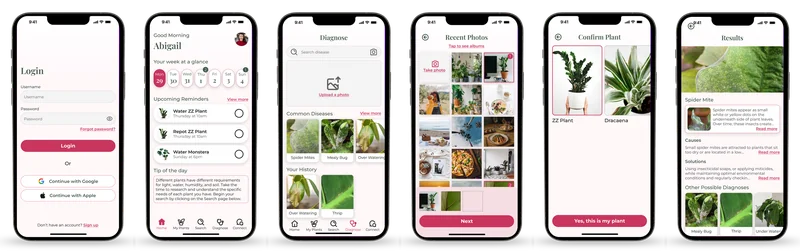
Low-fidelity wireframes of six screens including Login, Good Morning, Diagnose, Upload 3 Photos, Is this your plant, and the results screen
Image to drop in
plantopedia-wireframes-lo.png
Low-fidelity flowLogin → Dashboard → Diagnose → Upload photos → Confirm plant → Results. Grey-box layouts made it easy to question hierarchy without getting distracted by colour.

Research & Discovery

An unusual advantage.

I had something most solo concept projects don't have: real domain context. I was still working at the local nursery where I recruited participants, which meant I wasn't pulling strangers from a panel — I was talking to real plant owners in the context where they actually bought and thought about plants. That proximity made the interviews honest, and the patterns obvious.

22
Participants across
interviews + surveys
12 wk
End-to-end research
to high-fi
3 types
Core user personas
uncovered
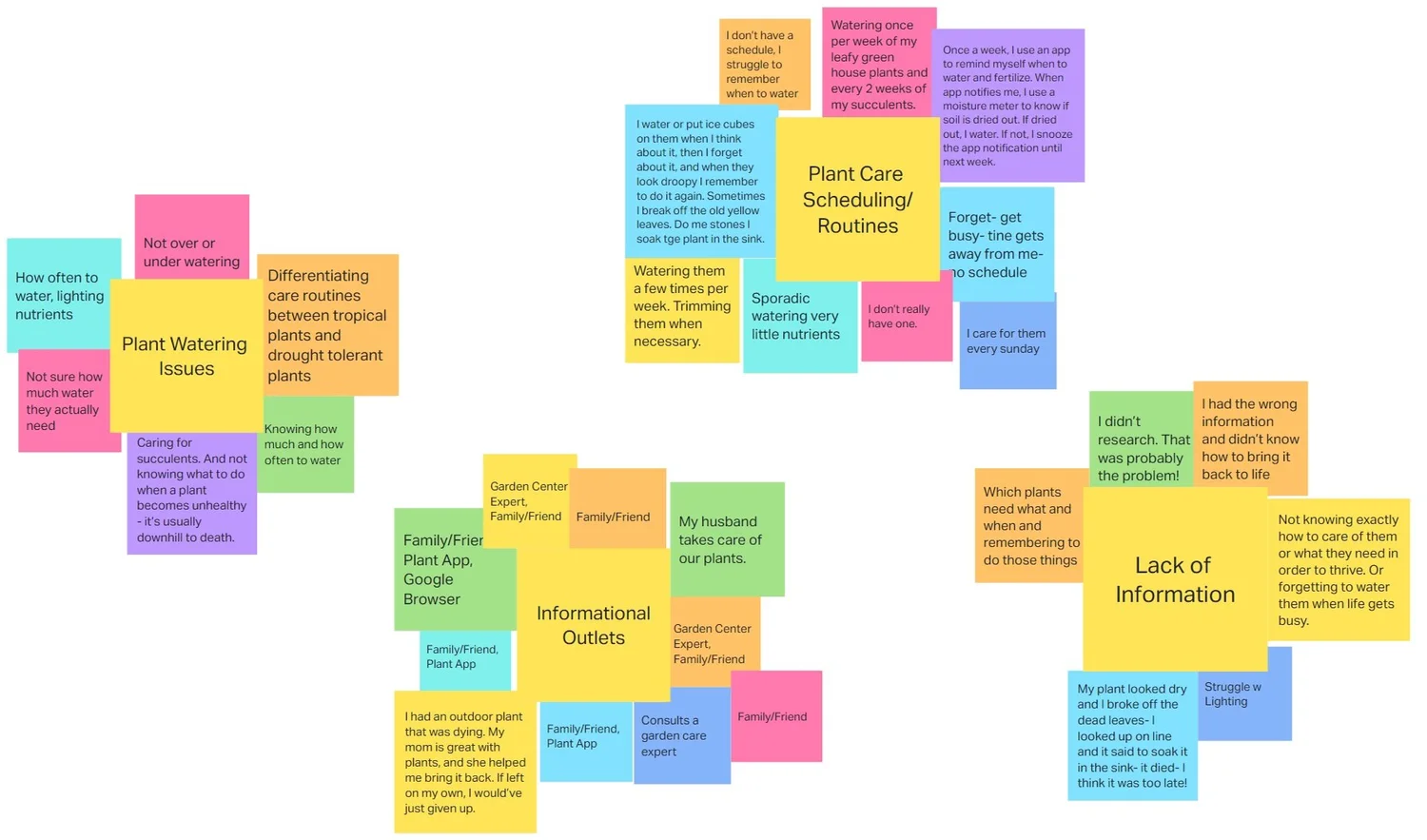
Affinity diagram of plant care scheduling routines — sticky notes organized around user quotes about watering habits
Image to drop in
plantopedia-affinity-diagram.png
Affinity diagram — plant care schedulingClustered quotes from 22 participants around watering and care routines. The pattern was loud: nearly everyone described their system as "I forget, then I remember, then I panic-water." The through-line — people wanted a system that respected how their memory actually worked — became the north star for the Plantopedia reminder + moisture-check flow.

The Users

Three types, one shared
frustration.

From the interviews, three core user types emerged — each with different needs, but all sharing the same underlying frustration: existing tools weren't meeting them where they were.

Persona 01
The Busy Beginner

New to plant care. Just wants simple, reliable instructions to keep their plant alive without becoming a researcher.

Persona 02
The Curious Hobbyist

Wants to improve skills and knowledge, but finds the sheer volume of information online overwhelming and contradictory.

Persona 03
The Experienced Collector

Already knows the basics. Values efficiency and quick access to information over long explanations.

Design Decisions

Personal, not clinical.

Every core feature was chosen to remove a specific friction I'd heard named in interviews — not to build yet another plant encyclopedia.

01
Calendar Overview

A glanceable calendar showing which plants need care on which day — so people can restructure their schedule around trips or busy stretches, not be surprised by them.

02
Check-Box Care

Each plant has a simple checkbox next to it, so caring for it feels satisfying and finished — no more wondering "did I already do that?"

03
Photo Identification

Upload or snap a photo of a new plant to identify it and auto-populate its care profile — removing the biggest point of anxiety for beginners.

04
Priority-Sorted Library

My Plants list auto-sorts so the plants that need care soonest surface at the top — making the next action always obvious.

Every screen doing
one clear job.

The final interface kept a tight visual system — one primary action per screen, consistent use of the sage + fuchsia palette to signal care states, and generous white space so the content could actually breathe. Nothing here is decorative; every component earns its place by solving a behaviour I heard named in research.

Plantopedia high-fidelity lineup showing Login, Good Morning dashboard, Diagnose, Recent Photos, Confirm Plant, and Results with Spider Mite diagnosis screens
Image to drop in
plantopedia-hifi-lineup.png
Final productSix key screens from login through diagnosis: Login → Good Morning dashboard → Diagnose → Recent Photos → Confirm Plant → Results.

Usability Testing

Small reworks,
big unlocks.

Two things emerged from usability testing that required real reworks, not just tweaks. Each had a clear problem that was consistent before the fix — and gone after it.

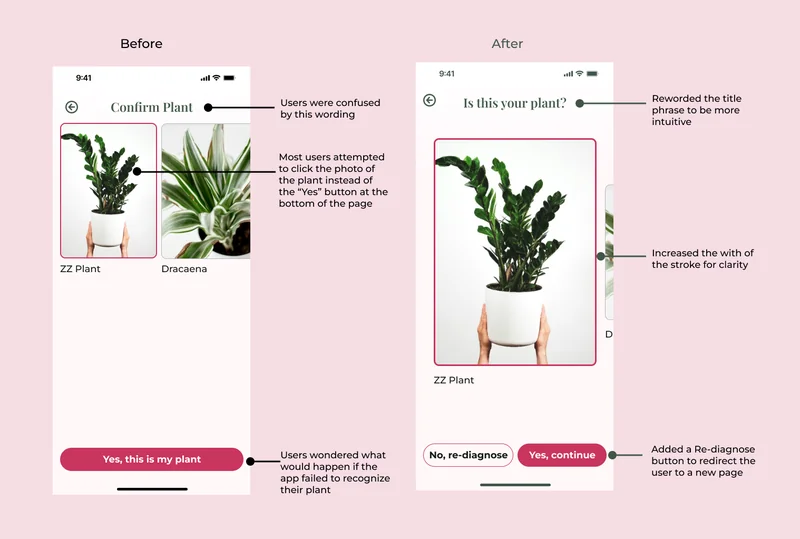
Before and after comparison of the Confirm Plant screen, with callouts explaining the wording change and button redesign
Image to drop in
plantopedia-before-after.png
Annotated before/afterThe Confirm Plant rework side-by-side, with the specific usability observations that drove each change.
Before
"Confirm Plant"

Users were confused by the wording. Most attempted to tap the photo of the plant instead of the "Yes" button at the bottom of the page.

After
"Is this your plant?"

Reworded the title to a more intuitive question, and increased the stroke weight on the confirm button for visual clarity. Tap-to-photo confusion disappeared.

Before
Dead end on mis-ID

When the app failed to recognize a plant, users wondered what to do next. No clear recovery path meant drop-off at a critical trust moment.

After
"No, re-diagnose"

Added a Re-diagnose button that redirects the user to a new attempt page. Recovery feels deliberate instead of broken, and trust in the identification stays intact.

A grown-up take
on plant care.

The visual system balances a naturalistic sage-and-pine palette with a confident fuchsia accent — signalling "this is editorial, not childish" while keeping the primary CTAs unmissable. Playfair Display anchors the identity; Montserrat handles the work.

Plantopedia brand style guide showing primary and accent colours, grays, typography, button states, iconography, and wordmark
Image to drop in
plantopedia-style-guide.png
Style guidePalette: Deep Sage #435A4A, Egg Shell White #FFF8F9, Fuchsia #C9355E, Slipper #F6DDE4, Sage #B0C4B1, Pine Green #131B15, and a full gray scale. Type: Playfair Display Semibold headings, Montserrat body. Buttons, iconography, and the Plantopedia wordmark round out the system.

Real domain
context.

Working at the nursery while building this gave me something most concept projects don't have — real domain context. I wasn't just designing for a user type I'd read about. I was talking to them every day, watching them pick up plants they didn't know how to care for, and listening to the questions they actually asked.

That proximity shaped every design decision, and it's the reason the research felt grounded rather than generic. Plantopedia was a blast to work on, and it pushed my UX skills further than I expected — the kind of project that reminds me why I love this work.

  • Recruit from the context where your users already are, not from panels
  • Let usability testing require real reworks, not just tweaks
  • Design the recovery path, not just the happy path
  • Replace generic reminders with prompts that reflect real needs
← Previous Project Metaquest VR Usability Benchmark

Have a product that needs
grounded UX?

Let's talk about the friction you've been quietly noticing.

Book a Discovery Call